
ICT Tech Tips: How to Protect and Safely Clean your Lenovo Laptop
General steps to clean the external surface of your laptop.
Shut down your laptop and unplug it from any power source before you start cleaning.
DO NOT use alcohol in cleaning your laptop’s external surface since it will damage the carbon fiber magnesium finish of the laptop.
| Procedure | Remarks | |
| Wiping the screen | ||
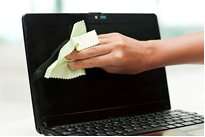 |
Clear surface dust with a dry microfiber cloth. Fold the cloth and rub it gently across the full width of the screen, back and forth. You may want to brace the screen with your other hand, so it does not move. | Don't press hard into the screen or try to scratch off stubborn spots – this may damage your screen. Use only the lightest pressure to wipe off surface dust. For stubborn spots, use very small amount of distilled water onto your microfiber cloth and wipe gently. |
| Polish in a circular motion to remove streaks. | Start at the top corner and proceed in tight circles across the top of your screen, then back and forth until you get to the bottom. | |
| Cleaning the keyboard | ||
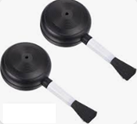 |
Use soft brush or blower brush for the tiny spaces between keys. | Don't brush too hard, tilt your laptop, and use the blower brush to blow the dust under the keys. Do not use a regular vacuum in cleaning the laptop keyboard. Unless it is a vacuum cleaner for PC. |
| Cleaning the exterior | ||
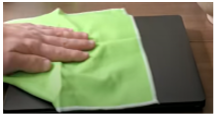 |
Polish and dry the surface with a microfiber cloth. Take microfiber cloth and wipe the entire case using circular motion. This will remove any moisture and streaks your cleaning may have left on the finish of the case. | Use light pressure to avoid squeezing moisture into the machine. Do not use alcohol in wiping the case as this will damage the surface. |
After the replacement cycle of our laptops, we reuse them as service units or donate them. As such, kindly avoid putting stickers on the laptop due to the following reasons:
• Adhesive residue: It will leave greasy glue on laptop surface when the sticker is removed. This will worsen after a sticker has been on the laptop for a long time.
• Sticker silhouettes: Even if there's no residue, there's a chance that the sticker's design will be imprinted on the laptop as the surface around it fades.
For inquiries and concerns, you may contact our AC ICT Helpdesk:
Hotline: (02) 7-908-3400
Email: helpdesk@ayala.com
Thank you for your usual support.
About the author
Information and Communication Technology
The ICT Department of the Company exists for the purpose of identifying, analyzing, selecting, implementing, supporting and maintaining ICT infrastructure and systems that increase overall organizational productivity and performance while also supporting the Company’s overall strategic vision and objectives. The support provided by the ICT Department plays a critical role in the Company, from strategy and policy planning, design of business processes, organizational structuring, resource management, and operational planning and control.